
Record the change.
Keep variation orders and site records with the job they belong to.
SCAFFOLDING MANAGEMENT SOFTWARE
Quotes, gangs, site paperwork
and payment claims.
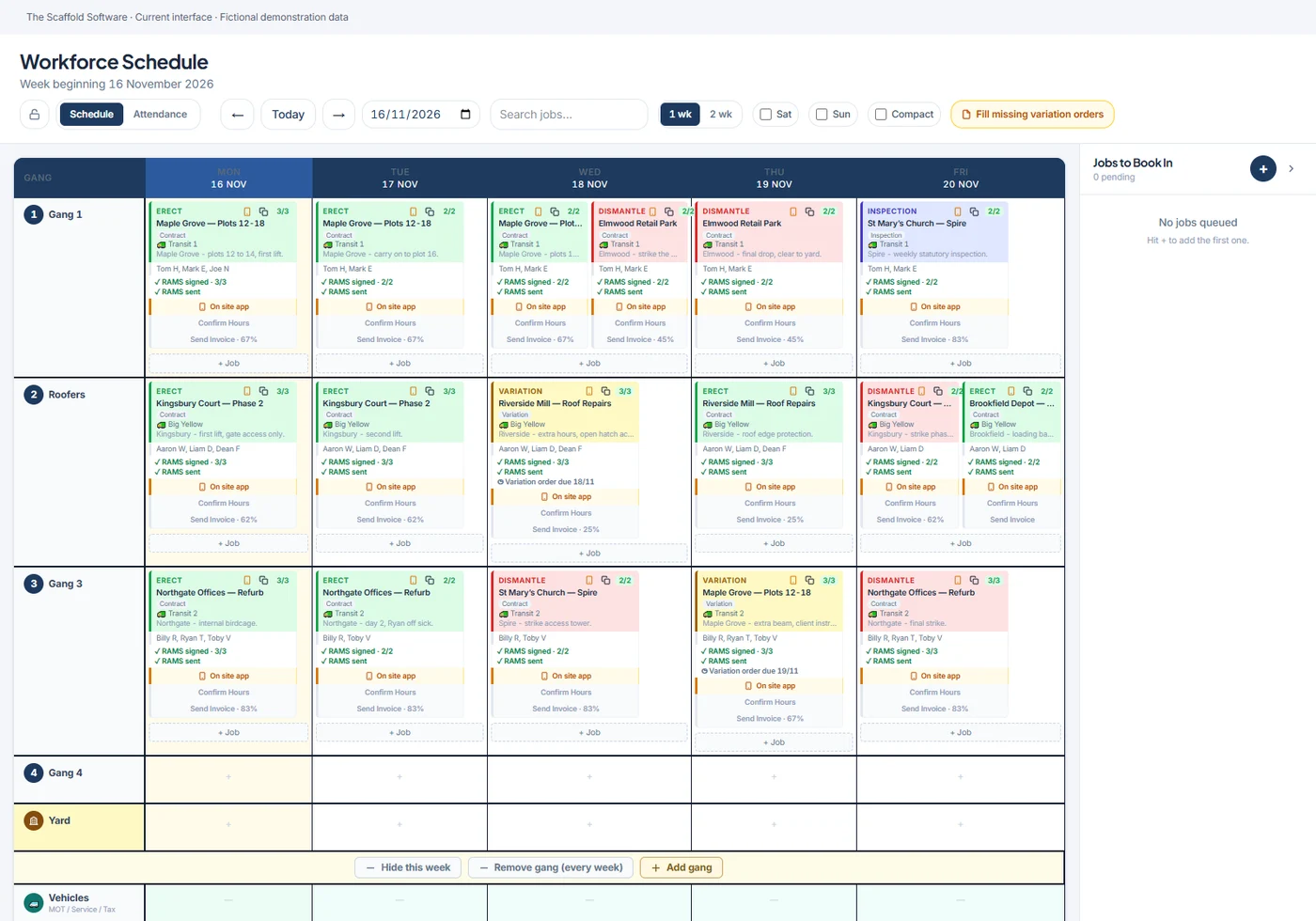
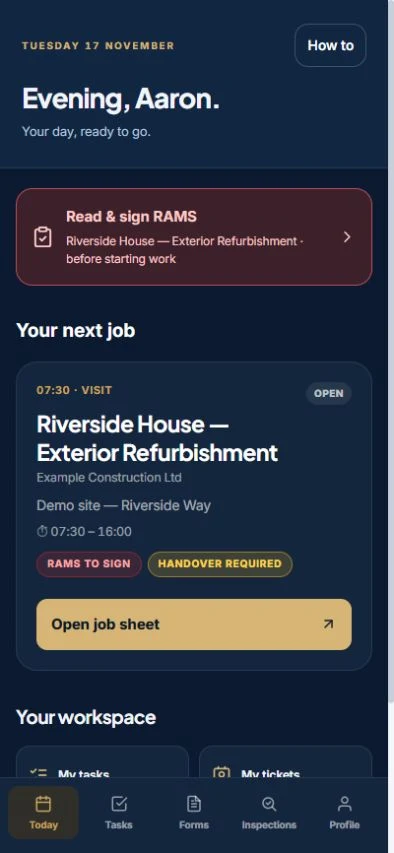
From first enquiry.
To final invoice.
For the way you work.
THE SCAFFOLD SOFTWARE
Quote it. Model it. Schedule it. Build it. Get paid.
Choose a time for a one-hour Teams demo.
Or start a 7-day management trial · No card needed · Set up by our team


























01 / FROM ENQUIRY TO INVOICE
Built for UK scaffolding contractors, our management software connects enquiries, estimating, gang scheduling and site operations with hire, payment claims and invoicing. Keep the information with the job, from the first price to the last payment.
Capture the enquiry, build the quotation and show the client what you’re proposing. With the 3D package, the scaffold model and counted kit support your price.
Real product screens · Example job data
02 / 3D SCAFFOLD MODELLING
Put the scaffold in the picture with browser-based 3D scaffold modelling and estimating software. Draw the building, review the scaffold and price the work using your own rates.
See the 3D Project PackageA proposal they can understand.Show the access, lifts and scope before the work starts.
The quantities behind your quote.A counted gear list from the model you’ve built.
Still part of the same job.Keep the model with the enquiry, quotation and project.

Temporary roof — view 1 · Four saved views of temporary roof scaffolds.
Proposal and planning models. Required engineering design and competent-person checks remain part of the project.
03 / THE WORK CHANGES. KEEP THE NUMBERS WITH IT.
Connect the variation, the hire and the payment claim to the job. Give the office a clearer view of what’s been quoted, claimed, invoiced and paid.
Keep variation orders and site records with the job they belong to.
Bring extra hire, work completed and payment claims into the commercial workflow.
Track the income and costs behind each project, while the work is still live.
 FROM A FIRM IN YOUR TRADE
“The cost-tracking element makes it so easy for us to see what each job costs and profits. I’m glad we got on board.”Cornfield Scaffolding Ltd THE SCAFFOLD SOFTWARE CUSTOMER
04 / START WHERE YOUR BUSINESS NEEDS IT.
Start with management, focus on 3D quoting, or connect both. We’ll walk through the options against the way your firm works.
For the owner, estimator and office team keeping the jobs, gangs and paperwork moving.
The management workflow and the 3D quote builder together, from proposal through to invoice.
For firms that want to start with clearer scaffold proposals and the quantities behind the price.
No card needed for a trial. Our team checks your request and emails your login.
Features, user limits and add-ons vary by plan.
Yes. The platform covers enquiries, quotations, scheduling, site paperwork, hire, variations, payment claims and invoicing. Management features and 3D modelling are available through different packages; your demo can cover either or both.
View assigned jobs, tasks and to-do items, RAMS sign-on, handovers, inspections, project hours and variation orders. We’ll confirm the features and configuration that fit your team during the demo.
Yes. The 3D package supports your own rates alongside the scaffold model and counted gear list, so you can explain both the proposed scaffold and the price behind it.
Keep hire, extra hire and variations with the project, then follow the commercial workflow through payment claims and invoicing. Explore scaffold hire tracking and compare the features included in each plan.
Choose an available time on our booking page, enter your details and confirm your booking by email. We’ll take you through the software in a one-hour Microsoft Teams walkthrough, focused on what matters to your firm. Times are shown in UK time. Book demo.
Request a 7-day management trial or a separate 3-day standalone 3D trial. No card is needed. The team checks your request, sets up your access and emails your login.
Bring your current process to the demo. We can discuss your existing records, accounting and site workflows, then agree a practical place to start.
See one scaffolding job move from enquiry and 3D quote to the gang schedule, site paperwork and invoice. A one-hour Microsoft Teams walkthrough, focused on your business.
Management trial: 7 days. Standalone 3D: 3 days.
No card needed. Our team sets up your access and emails your login.
Pick an available slot in the live calendar. Times are shown in UK time.
Confirm within 15 minutes using the email we send you. Your meeting details follow.
See the workflow, ask your questions and find the package that fits your firm.
Prefer to speak to us first? 0330 133 1808